
Meeting intelligence, owned by you
Every conversation,
on the record.
Nothing to pick before the call, nothing to file after it. Every conversation comes back transcribed in the language it happened in, readable in Chinese or English, and open to the AI assistant you already work in.
Tape launch film · 30 seconds
English captions included
Records wherever your team already meets
 Google Meet
 ZoomRecall.ai
 ElevenLabs
 Neon
Neon Cloudflare
 OpenRouter
01 · Memory
Context that
carries over.
- Recurring calls become one thread
- Tape groups a series as the meetings arrive, so a weekly sync reads as a single running conversation instead of forty unrelated files. There are no folders to keep tidy.
- People, companies, and numbers, picked out
- Entities mentioned in the room are detected and linked, so you can follow one company across every meeting it came up in.
- How the room actually sounded
- Talk share, pace, and tone per speaker sit next to the transcript rather than in place of it. The record stays the record.
Meeting library
GroupedWeekly partner sync
14 in seriesContext carried- Jul 1648mScheduler$40k
- Jul 0952mSchedulerRollback
- Jul 0245mPricing
Design review
6 in seriesContext carried- Jul 1431mOnboarding
- Jul 0728mOnboardingMobile
Investor update
9 in seriesRelated meetings, grouped as they arrive
02 · Every language
Two languages,
one transcript.
- Nothing to set before the call
- Other tools make you name the language first and mangle the meeting when you guess wrong. Tape picks it up from the audio, so a sentence that starts in English and finishes in Mandarin still arrives as one clean line.
- Chinese and English, line for line
- Every line keeps its original text beside the translation, so you can read at speed and still check exactly what was said.
- Fix a word and it stays fixed
- Names and jargon that came back wrong are yours to correct. The edit holds for everyone reading the meeting afterwards.
Platform planning · 41 min
中文 → EN- Lin04:12
我们下周把数据管道切到新的调度器。
We move the data pipeline onto the new scheduler next week.
- Marco04:26
回滚方案要先写好,别到时候手忙脚乱。
Write the rollback plan first, so nobody is scrambling on the day.
- Lin04:41
预算那块我下午发你一份明细。
I will send you a breakdown of the budget this afternoon.
Original and translation, line for line
03 · Agents
Your archive,
in your assistant.
Every notetaker now has a chatbot of its own. Tape takes the other route: it hands the whole archive to the assistant you already trust, and keeps the data on your side of the line.
you · ask your assistant
Where did we agree the security review lands?
tape · 3 meetings matched
- Weekly partner syncJul 16 · 12:04
- Platform design reviewJul 09 · 27:41
- Security questionnaire walkthroughJun 30 · 08:15
- Your assistant, not ours
- Tape publishes your archive over MCP, so Claude, Cursor, or whatever you already work in can query it directly. Read only, and no chatbot of ours to learn.
- It only sees what you can see
- The permission boundary is enforced by the database itself, not by the wording of a prompt. An assistant connected to Tape reaches exactly the meetings you could open by hand, and nothing beyond them.
- Search that reaches every word
- Full text across transcripts, speakers, titles, and detected entities, with the recording one click from any result.
04 · Capture
It records
itself.
- No bot in the room
- The macOS app records your microphone and system audio on your own machine. Nothing joins the call, nothing announces itself, and the conversation in front of you lands in the same archive as everything else.
- Or let it cover the calendar for you
- Connect a calendar and Tape can join your Zoom and Google Meet meetings on its own. Useful when you are double booked, and entirely optional.
- Speakers separated, then named
- Recordings are split by voice and matched to the people in the room, so every line arrives attached to whoever said it.
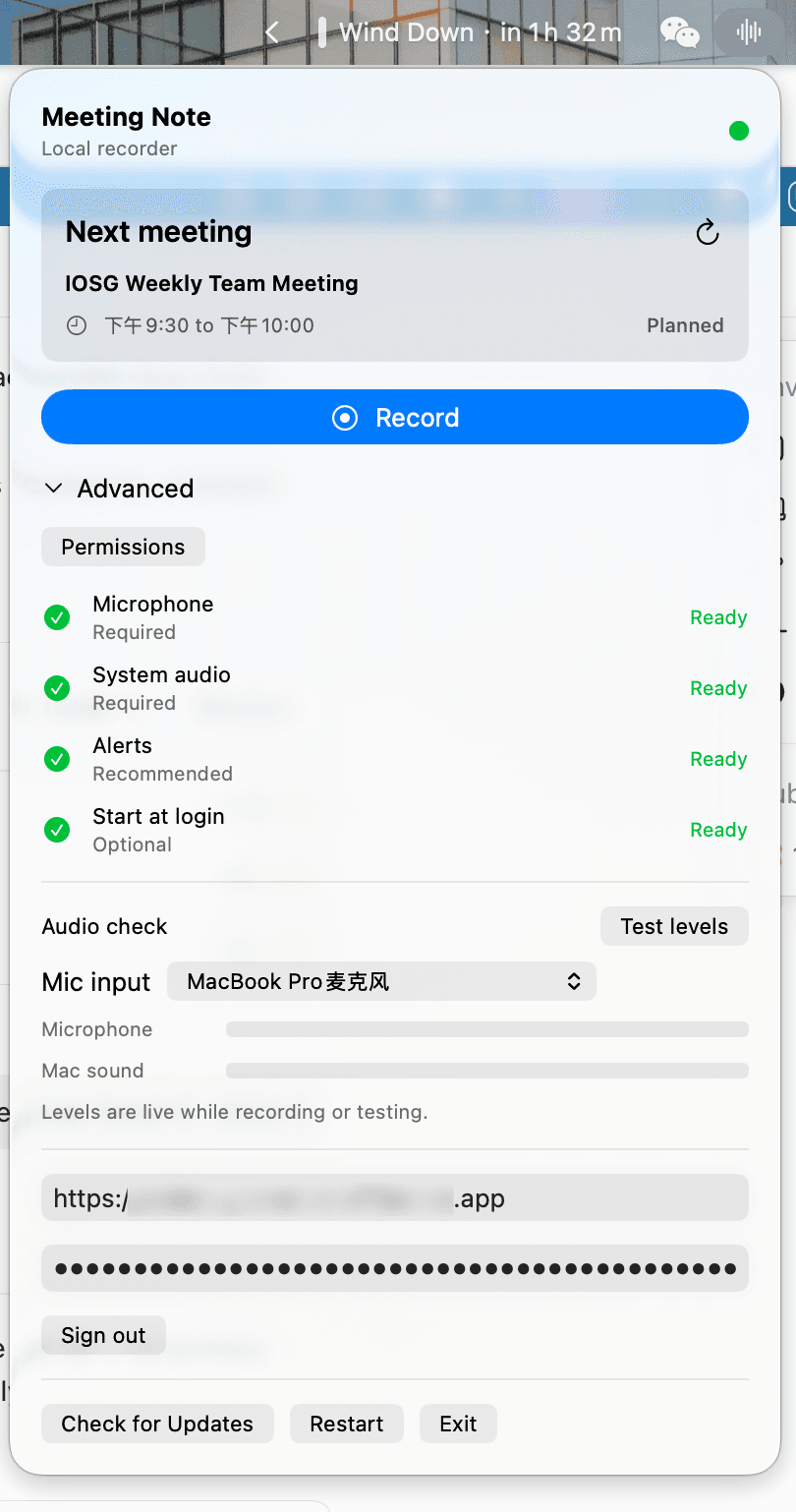
Tape for macOS · local recorder
05 · Enterprise
Built for the whole company,
careful with every word.
Share
Every future meeting in this series reaches them on its own. They never have to ask what they missed.
- A workspace per team
- Each team gets its own archive, its own members, and its own calendar connections. Nothing leaks sideways.
- Access that matches the room
- Members see their team's meetings. External readers see only what was handed to them, and nothing else in the archive.
- Links that stop working
- Send a transcript outside the workspace with a link that expires. Access ends when you decide it ends.
- Nobody wonders what they missed
- Share a recurring series once and a colleague receives every future instance of it, without having to ask again.
- Your transcripts leave whenever you want
- Take any meeting out as plain text and its audio as an mp3, whenever you like. Reading your own record is not something we would put behind a plan.
- Never training a public model
- Recordings, transcripts, and audio sit in a database you control and are not handed to third parties to train on. The source is on GitHub if you would rather check than trust.
06 · Pricing
Pay for compute,
not seats.
Enter what your team expects to record, or connect one calendar to prefill the assumptions from a recent sample of up to 90 days. Every assumption stays visible and editable.
This estimate uses 326 team meeting hours and 163 distinct recorded hours each month.
Estimated monthly total
$3.63 per person
$36.31
Recording
Speech to text
Database
Monthly infrastructure
$3.63
per person per month, all in
| Per-seat tools | Per seat / mo | 10 seats / mo |
|---|---|---|
| Fireflies Pro | $10.00 | $100.00 |
| Otter Pro | $8.33 | $83.33 |
| Granola Business | $14.00 | $140.00 |
| Tape (your stack) | $3.63 | $36.31 |
Estimates from public list prices, snapshot 2026-07-28. Recording and transcription scale with meeting hours; database and hosting are flat monthly. Self-hosted capture and transcription share one box, counted once. Neon is usage-based, Ali Paraformer is not publicly fixed — both shown as approximations. Per-seat quotes are annual-billing list rates.
07 · Questions
The things people
ask first.
- Does a bot join my meetings?
- Only if you ask it to. The macOS app records your microphone and system audio on your own machine, so nothing joins the call and nothing announces itself. Connecting a calendar so Tape can attend Zoom and Google Meet on your behalf is a separate choice you make, and you can leave it off.
- Which languages does Tape handle?
- You never tell Tape what language a meeting will be in. It is detected from the audio, so a sentence that starts in English and finishes in Mandarin comes back as one clean line instead of phonetic guesswork. Transcripts can then be read with Chinese and English side by side, line for line.
- Can my own AI assistant read my meetings?
- Yes. Tape publishes your archive over MCP, so Claude, Cursor, or whatever you already work in can query it directly instead of you copying transcripts around. Access is read only, and the permission boundary is enforced by the database rather than by the wording of a prompt: an assistant reaches exactly the meetings you could open by hand.
- Who can see a meeting I record?
- Each team gets its own archive, its own members, and its own calendar connections. People outside the workspace see only what you hand them, through links you can set to expire, and nothing else in the archive.
- Can I get my transcripts out again?
- Any meeting exports as plain text, and its audio as an mp3, whenever you want it. Tape is open source and runs on infrastructure you choose, so the recordings and the database stay on your side of the line and are never handed to third parties to train on.
- How is Tape priced?
- There are no per-seat licences. You run Tape on your own infrastructure and pay the providers directly for recording, transcription, summaries, database, and hosting, which is what the calculator above estimates. Cost scales with meeting hours rather than headcount.
Your next meeting, on the record.
Connect a calendar, or record the room you are sitting in. Tape takes it from there and hands you the archive.
SSO with Google · No credit card